요약
이 글은 Agno Agent Framework를 직접 사용해보며 구조, 성능, 설계 철학을 정리한 사용기다.
- Agno가 강조하는 인스턴스화 성능과 메모리 최적화 방식
- 최소한의 코드로 Agent, Tool, Memory, UI까지 구성하는 구조
- Multi-Agent(Teams), Knowledge, Memory 설계 방식
- AgentOS 기반 실행 환경과 MCP 연동 방식
LangGraph, CrewAI 등 기존 Agent Framework를 사용해봤거나
프로덕션 환경에서 Agent 인프라를 고민 중인 엔지니어에게 참고가 될 만한 내용이다.
TL;DR
Agno는 성능과 단순함을 강점으로 하는 AI Agent Framework다.
최소한의 코드로 Agent, Memory, MCP, Multi-Agent, UI까지 구성할 수 있으며
인스턴스화 속도와 메모리 효율을 중요하게 설계했다.
Agno는 2026년 1월 1일 기준으로 GitHub에서 약 36.5k의 스타를 받은 인기 있는 Agent 프레임워크다. 최근 며칠간 직접 Agno를 사용해 여러 에이전트를 구축해보며 느낀 점과 구조를 공유하고자 한다. Agent 개발 도구가 많은 가운데, Agno는 성능과 단순함 측면에서 돋보이는 툴로 평가할 만하다.
Agno Agent Framework의 성능 접근
벤치마크 결과
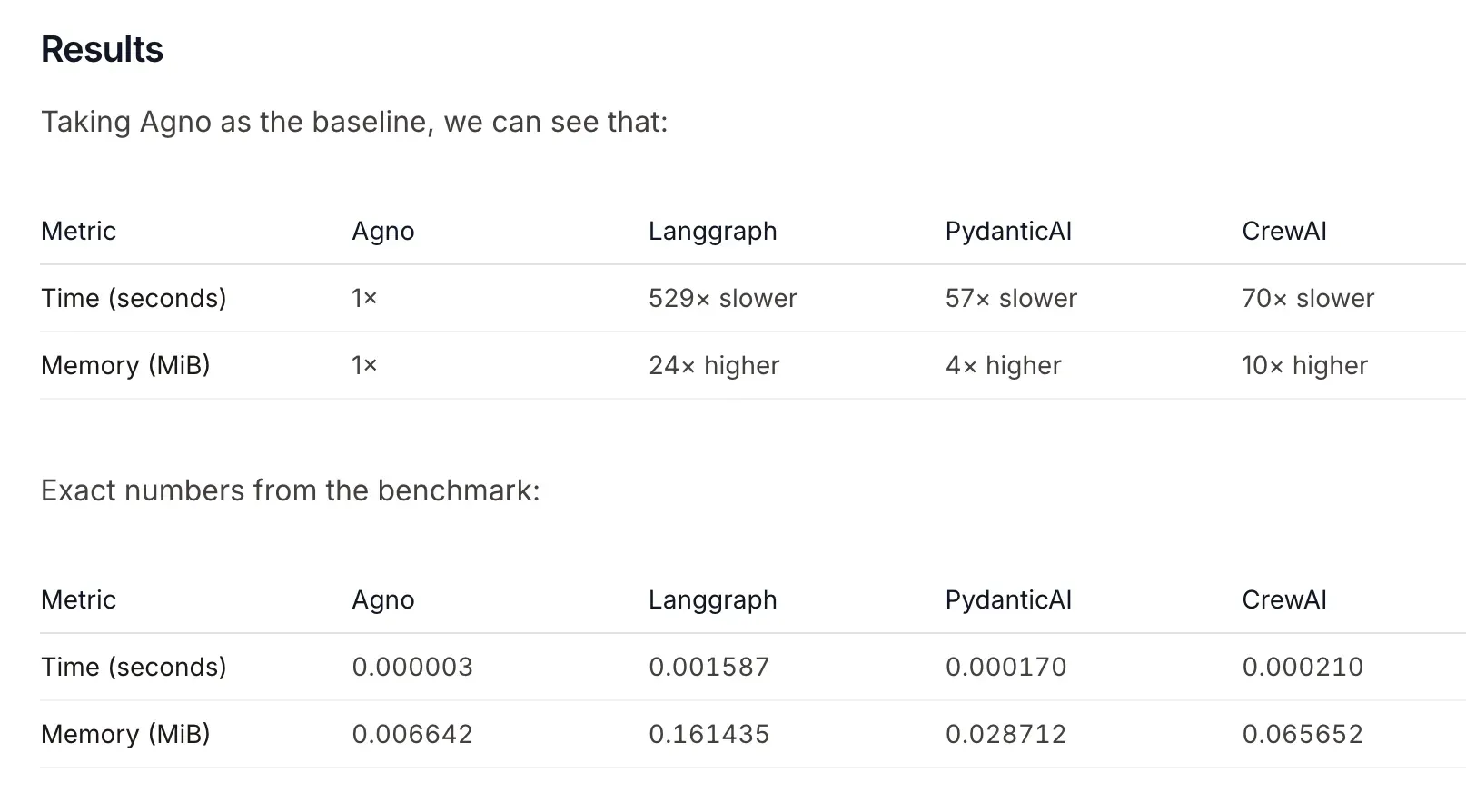
Agno가 2025년 10월에 공개한 성능 벤치마크에 따르면, Apple M4 MacBook Pro 환경에서 측정된 결과로, 여러 에이전트 프레임워크 대비 인스턴스화 속도와 메모리 사용량에서 우수한 성능을 보인다. 특히 LangGraph 기반 에이전트 대비 최대 529배 빠르다는 주장이 포함되어 있으며, 메모리 사용도 효율적으로 최적화되었다고 한다.
Instantiation Time에 대한 의문
벤치마크에서 측정한 시간은 에이전트를 인스턴스화하는 데 걸리는 시간이다. 일반적으로 서버를 항상 띄워두는 환경에서는 이 시간이 크게 중요하지 않을 수 있지만, 서버리스 아키텍처나 보안상의 이유로 세션 단위로 인스턴스화가 필요한 경우에는 중요한 요소가 될 수 있다. 사실, 빠르고 좋다는 부분이 에이전트 시스템을 구축하는 입장에서 기분 좋은 이야기이긴 하나, 개인적인 입장은 LLM자체가 너무 느려서 크게 체감되지는 않는다.
Agno의 최적화 전략
Agno는 에이전트 성능, 시스템 성능, 신뢰성과 정확성 측면에서 최적화를 진행했다고 한다. 특히 인스턴스화 과정, 메모리 공간 관리, 도구 호출, 메모리 업데이트, 기록 관리 등을 효율적으로 설계하여 속도를 높였으며, 메모리는 비동기 방식으로 운영해 시스템 메모리 누수를 방지한다. 또한 stateless 아키텍처를 기반으로 수평 확장이 가능하도록 설계된 점이 특징이다.
Agno Agent Framework의 단순한 설계
Agno 문서에 이런 내용이 있다.
25줄의 코드로 메모리와 상태를 가진 완전한 Agent를 만들 수 있다고 한다. 또한 FastAPI 기반의 앱 형태로 서버를 쉽게 띄울 수 있는 점도 강조되어 있다.
from agno.agent import Agent
from agno.db.sqlite import SqliteDb
from agno.models.anthropic import Claude
from agno.os import AgentOS
from agno.tools.mcp import MCPTools

# Create the Agent
agno_agent = Agent(
    name="Agno Agent",
    model=Claude(id="claude-sonnet-4-5"),
    # Add a database to the Agent
    db=SqliteDb(db_file="agno.db"),
    # Add the Agno MCP server to the Agent
    tools=[MCPTools(transport="streamable-http", url="https://docs.agno.com/mcp")],
    # Add the previous session history to the context
    add_history_to_context=True,
    markdown=True,
)

# Create the AgentOS
agent_os = AgentOS(agents=[agno_agent])
# Get the FastAPI app for the AgentOS
app = agent_os.get_app()
위 코드는 다음과 같은 요소를 포함한다.
- Agent 정의
- LLM 모델 선택
- DB 기반 히스토리 관리
- MCP Tool 연동
- FastAPI 서버 제공
이처럼 최소한의 코드로 Agent 구축과 서버 실행이 가능하다는 점이 Agno의 큰 장점이다.
위의 코드들을 기반으로 Agno Agent를 구성하는 주요 요소들을 살펴보자.
LLM 모델 선택
LLM 모델 선택은 Agent의 핵심 기능 수행을 위한 모델 호출 방식을 정의한다. Agno는 자체 모델 래퍼를 통해 다양한 모델을 지원하며, LiteLLM을 사용하지 않고 직접 모델을 호출하는 구조다. 지원하는 모델 리스트는 공식 문서에서 확인할 수 있다.
에이전트 정의
에이전트 정의는 Agent가 수행할 역할과 동작 지침을 설정하는 부분이다. 간단한 이름과 instructions 프롬프트를 입력하여 에이전트의 역할을 명확히 할 수 있고, 멀티 에이전트 환경을 위해 role 설정도 가능하다.
agent = Agent(
    name="test_agent",
    model=OpenAIChat(id="gpt-5-nano"),
    role="You are a test agent.",
    instructions="You are a test agent. You are tasked with testing the agent's functionality. You will be given a task and you will need to complete it.",
)
DB - 히스토리 관리
히스토리 관리는 에이전트가 이전 대화 내용을 기억하고 활용할 수 있도록 도와준다. Agno는 아주 간단한 설정으로 DB 기반 히스토리 관리를 지원한다. 이를 다른 프레임워크에서 직접 구현해본 경험 상, 이렇게 간단하게 히스토리를 관리할 수 있다는 점은 큰 장점으로 보인다.
Agent(...,
      db=SqliteDb(db_file="agno.db"),
      add_history_to_context=True,
)
Tools 연동
Agent가 외부 도구와 상호작용할 수 있도록 MCP 같은 툴을 간편하게 연결할 수 있다.
Agent(...,
      tools=[MCPTools(transport="streamable-http", url="https://docs.agno.com/mcp")],
)
Memory, Knowledge 등도 유사한 방식으로 쉽게 추가할 수 있다. 이에 대해서는 조금 있다가 자세히 알아보도록 하자.
UI 제공
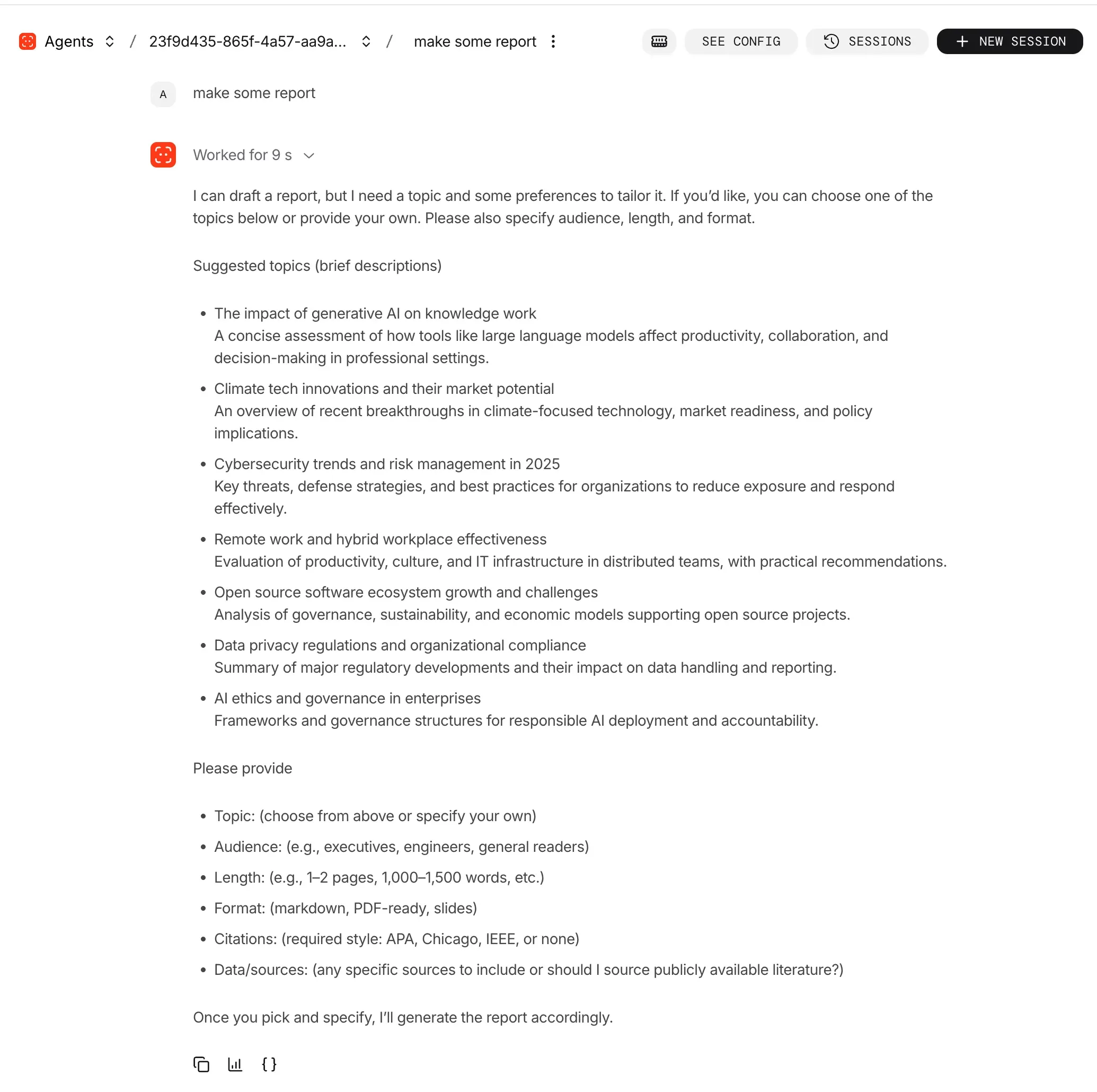
Agno는 Agent를 실행하면 자동으로 사용할 수 있는 UI를 제공한다. FastAPI 앱 형태로 서버를 띄운 후, Agno에서 제공하는 https://os.agno.com/chat 사이트와 로컬 포트를 연결하면 UI와 연동된다.
import os

from settings import settings

os.environ["OPENAI_API_KEY"] = settings.OPENAI_API_KEY

from agno.models.openai import OpenAIChat
from agno.tools.hackernews import HackerNewsTools
from agno.os import AgentOS
from agno.agent import Agent

agent = Agent(
    model=OpenAIChat(id="gpt-5-nano"),
    tools=[HackerNewsTools()],
    instructions="Write a report on the topic. Output only the report.",
    markdown=True,
)

# Create the AgentOS
agent_os = AgentOS(agents=[agent])
# Get the FastAPI app for the AgentOS
app = agent_os.get_app()
이 코드를 FastAPI 개발 서버로 실행하면, UI를 통해 에이전트를 손쉽게 테스트할 수 있다. 운영 단계 이전에 빠르게 Agent를 검증하거나, 비개발자와 결과를 공유해야 하는 상황에서 매우 유용한 기능이다.
Multi-Agent Framework – Agno Teams
Agno에서는 멀티 에이전트 구성을 Teams라는 단위로 제공한다. Team은 여러 Agent를 묶어 역할 기반 오케스트레이션을 수행한다. 즉, Team 내 에이전트들이 역할에 따라 작업을 분담하고 협업할 수 있도록 지원한다.
import os

from settings import settings

os.environ["OPENAI_API_KEY"] = settings.OPENAI_API_KEY

from agno.agent import Agent, RunOutput
from agno.models.openai import OpenAIChat
from agno.team import Team
from agno.utils.pprint import pprint_run_response

# Research Agent: Gathers and analyzes information on given topics
research_agent = Agent(
    name="Research Agent",
    role="Research Specialist",
    instructions="You are a research specialist. Gather comprehensive information, analyze data, and provide well-structured research findings on the given topic.",
    markdown=True,
)

# Writer Agent: Creates content based on research findings
writer_agent = Agent(
    name="Writer Agent",
    role="Content Writer",
    instructions="You are a professional content writer. Create engaging, well-structured content based on the research provided. Focus on clarity and readability.",
    markdown=True,
)

# Create the team
team = Team(
    name="Content Creation Team",
    members=[research_agent, writer_agent],
    model=OpenAIChat(id="gpt-5-nano"),
    instructions="You coordinate the research and writing process. First, delegate research tasks to the Research Agent, then pass findings to the Writer Agent for content creation.",
    markdown=True,
)

# Run agent and return the response as a variable
response: RunOutput = team.run("Write a 3-paragraph blog post about the benefits of multi-agent AI systems")

# Print the response in markdown format
pprint_run_response(response, markdown=True)
짧은 코드로 역할 분담과 협업이 가능한 멀티 에이전트 환경을 쉽게 구축할 수 있다.

Knowledge & Memory – Agno Agent 설계
Agno는 Agent 성능을 좌우하는 핵심 요소로 Memory와 Knowledge를 알아보자.
Memory
Memory는 에이전트가 대화나 작업 중 얻은 정보를 저장하고 활용하는 컨텍스트 역할을 한다. Agno는 크게 두 가지 메모리 방식을 제공한다.
| 구분 | Automatic Memory | Agentic Memory |
|---|---|---|
| 활성화 옵션 | enable_user_memories=True | enable_agentic_memory=True |
| 동작 방식 | 대화 중 자동으로 메모리를 생성, 저장, 업데이트 | 에이전트가 판단하여 저장할 정보만 선택적으로 저장 |
예시 - Automatic Memory:
from agno.agent import Agent
from agno.db.sqlite import SqliteDb

db = SqliteDb(db_file="agno.db")

agent = Agent(
    db=db,
    enable_user_memories=True,
)

agent.print_response("My name is Sarah and I prefer email over phone calls.")
agent.print_response("What's the best way to reach me?")
예시 - Agentic Memory:
from agno.agent import Agent
from agno.db.sqlite import SqliteDb

db = SqliteDb(db_file="agno.db")

agent = Agent(
    db=db,
    enable_agentic_memory=True,
)
Agno는 SQLite 뿐만 아니라 PostgreSQL 등 다양한 DB를 지원하며, 수동으로 메모리를 조회하는 것도 당연히 가능하다.
from agno.agent import Agent
from agno.db.postgres import PostgresDb

db = PostgresDb(
    db_url="postgresql://user:password@localhost:5432/my_database",
    memory_table="my_memory_table",
)

agent = Agent(db=db)

agent.print_response("I love sushi!", user_id="123")

memories = agent.get_user_memories(user_id="123")
print(memories)
Knowledge
Knowledge는 외부 정보나 문서 등을 기반으로 한 지식 베이스 역할을 하며, 주로 RAG 시스템 구축에 활용한다.
import asyncio

from agno.agent import Agent
from agno.db.postgres.postgres import PostgresDb
from agno.knowledge.embedder.openai import OpenAIEmbedder
from agno.knowledge.knowledge import Knowledge
from agno.vectordb.pgvector import PgVector

db = PostgresDb(
    db_url="postgresql+psycopg://ai:ai@localhost:5532/ai",
    knowledge_table="knowledge_contents",
)

knowledge = Knowledge(
    name="Basic SDK Knowledge Base",
    description="Agno 2.0 Knowledge Implementation",
    contents_db=db,
    vector_db=PgVector(
        table_name="vectors",
        db_url="postgresql+psycopg://ai:ai@localhost:5532/ai",
        embedder=OpenAIEmbedder(),
    ),
)

asyncio.run(
    knowledge.add_content_async(
        name="Recipes",
        url="https://agno-public.s3.amazonaws.com/recipes/ThaiRecipes.pdf",
        metadata={"user_tag": "Recipes from website"},
    )
)

agent = Agent(
    name="My Agent",
    description="Agno 2.0 Agent Implementation",
    knowledge=knowledge,
    search_knowledge=True,
)

agent.print_response(
    "How do I make chicken and galangal in coconut milk soup?",
    markdown=True,
)
위의 코드는 Agno Docs에 있는 예제 코드이다. Knowledge 기능은 다소 복잡해 보일 수 있으나, 위와 같은 코드로 RAG 시스템을 쉽게 구축할 수 있다는 점이 인상적이다.
마치며
Agno는 빠른 인스턴스화 속도, 메모리 효율성, 단순한 API 구성, 그리고 멀티 에이전트 지원까지 폭넓은 기능을 갖춘 Agent 프레임워크다.
최소한의 코드로 프로덕션급 Agent 인프라를 빠르게 구성하려는 팀에 특히 적합하다.
이 글에서 언급한 기능 외에도 Agno Agent Framework는 대부분의 Agent 시스템에 필요한 구성 요소를 폭넓게 지원한다.
기능이 부족해 에이전트 시스템 구축이 막히는 경우는 거의 없을 것으로 보이며, 단순함을 유지하면서도 충분한 커스터마이징 여지를 제공한다는 점이 강점이다.
Agno가 이러한 시스템을 AgentOS라는 개념으로 확장해 설명하는 것도 자연스럽다.
SDK를 넘어 실행 환경까지 포괄하려는 방향성이 드러나며, 유료이긴 하지만 클라우드 옵션을 함께 제공하는 점 역시 같은 맥락에서 이해할 수 있다.
수많은 에이전트 SDK와 프레임워크가 등장하는 상황에서 Agno가 장기적으로 어떤 위치를 차지할지는 단정하기 어렵다.
다만 구조, 성능, 단순함이라는 측면에서 보면 현재 시점에서 충분히 주목해볼 만한 Agent Framework인 것은 분명하다.